AI Content Creation Workflow: 7-Step System for High-ROI Content in 2025
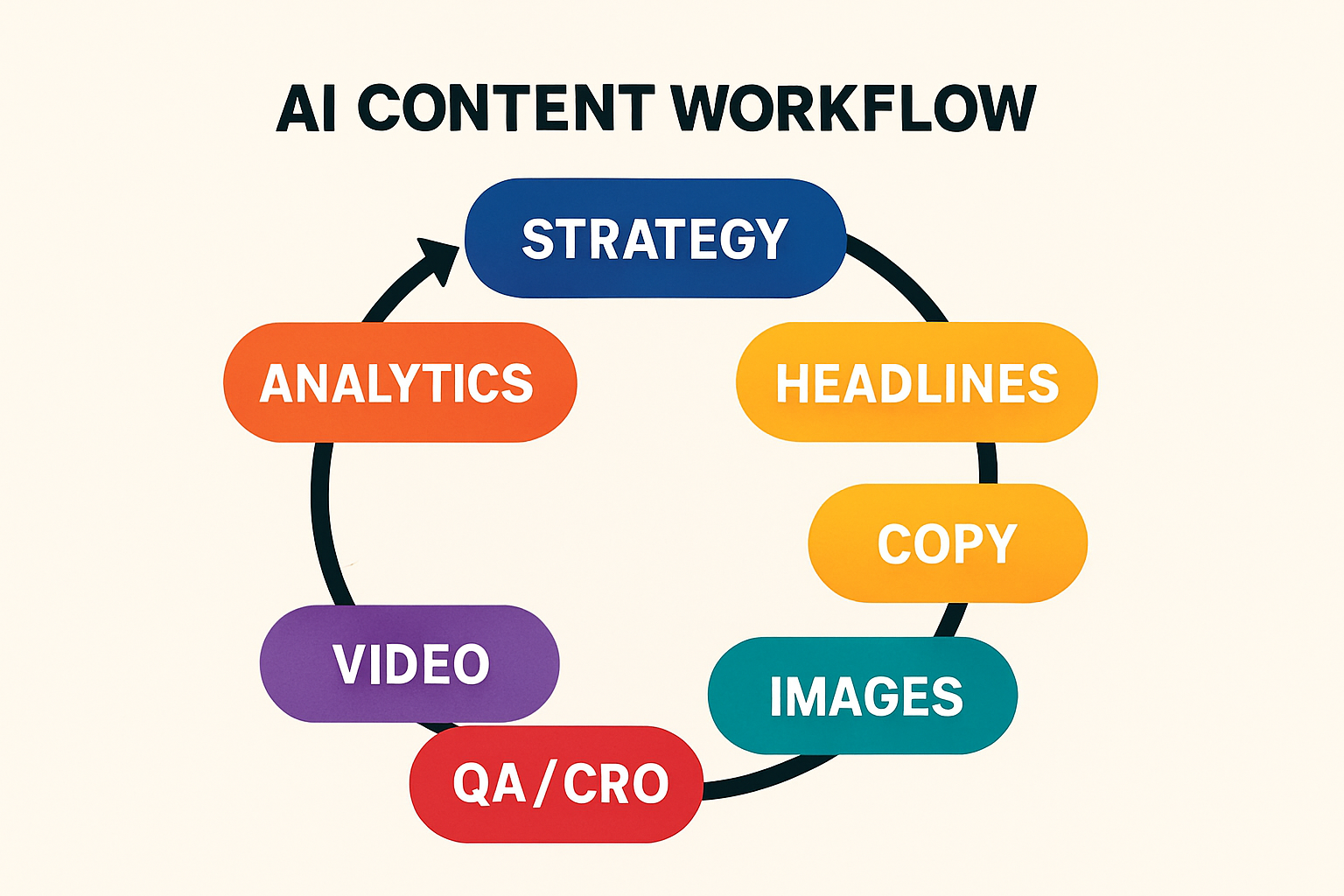
You do not need more content—you need content that works. This guide shows how to build a high-ROI, AI content creation workflow that ships faster, converts higher, and stays on-brand. In the next 7 steps, you'll get a complete system across strategy, headlines, copy, visuals, video, QA/CRO, and analytics—plus ready-to-use templates and a developer handoff plan.
What AI Content Creation Really Means in 2025
Definition: AI content creation is the practice of using AI systems to ideate, draft, design, and optimize digital assets—then combining those outputs with human judgment, governance, and testing to drive measurable business outcomes.
AI now supports the full content creation process: research, outlines, drafts, design, video, distribution, and optimization. Large teams are standardizing on these workflows for speed and consistency, while smaller teams use AI to punch above their weight.
The ROI case for AI content creation
- Documented strategy matters: organizations with a content strategy see 33% higher ROI than those without.
- Adoption is mainstream: most large teams report using AI in content workflows.
- Output mix is shifting: research indicates AI will generate a substantial share of content consumed globally by 2025.
- Format winners: short-form video, AI-enhanced podcasts, and interactive content are leading ROI performers.
- Cost and speed: teams report major reductions in content production time and spend when applying AI-assisted processes.
Practically, this means marketers and developers can reallocate effort from production to testing and iteration—where ROI is decided.
Where AI fits in the content creation process
Use this end-to-end map as a checklist. It's optimized for snippet capture.
- Strategy: ICPs, offers, goals, and governance.
- Ideation: briefs, outlines, prompts, and title variants.
- Production: draft copy, visuals, and scripts with human-in-the-loop QA.
- Design: layout, typography, images, components, and exports.
- Distribution: CMS, email, social, and syndication.
- Optimization: A/B tests, on-page SEO, speed and accessibility checks.
- Analytics: dashboards, content scoring, and feedback loops to refine prompts and assets.
Tool categories: creator tools vs. digital software
Clarify your stack by separating lightweight creator tools from full digital content creation software suites.
| Category | Best For | Pros | Considerations |
|---|---|---|---|
| Creator tools | Rapid tasks (headlines, ad copy, quick visuals) | Fast, focused, often free; minimal learning curve | Limited workflows; governance is manual |
| Digital software suites | Large teams, workflows, approvals, integrations | Versioning, permissions, templates, enterprise support | Higher cost; training and rollout required |
Step 1 — Strategy, Brief, and Templates
Great AI outputs start with constraints. Define your audience, offers, and success metrics; write clear briefs; and standardize content creation templates to keep work on-brand and measurable.
Audience, offer, and conversion goal mapping
Map each asset to one persona, one offer, and one primary conversion. This supports AI conversion rate optimization by focusing copy and UX on the job to be done.
- Persona clarity: stage, pains, vocabulary, objections.
- Offer definition: demo, lead magnet, free tool, trial.
- Primary action: click, sign up, download, purchase.
Content creation templates and briefs
Create reusable scaffolds for blogs, ads, and landing pages. A solid brief beats an average prompt. Include:
- Problem, promise, proof, proposal (4P) structure.
- SEO inputs: primary keyword, search intent, internal links.
- Brand constraints: voice, claims, mandatory CTAs, legal notes.
- Design constraints: headline length, typography, component limits.
Need titles and hooks? See our blog title and ad headline generator ideas for 2025.
Governance and brand voice
Codify tone, claims, sources, disclaimers, and approvals. Many teams keep a central doc with examples of "approved" and "avoid" copy, plus fact sources. This reduces rework and keeps AI outputs consistent and compliant.
Step 2 — Headlines That Convert with Pretty Headline (Free)
Headlines set relevance and control attention. With Pretty Headline—a free, browser-based, WYSIWYG headline designer—you can ship high-converting, SEO-friendly hero copy in minutes.
Crafting SEO-friendly, conversion-optimized headlines
- Match search intent: reflect the user's job ("Compare", "Buy", "How to").
- Lead with value: compress the benefit into 6–12 strong words.
- Use proof: add a subhead with a stat, social proof, or specific outcome.
- Design for scannability: line breaks, highlight key nouns/verbs, and keep mobile-first readability.
Pretty Headline supports professional typography (Google Fonts), highlights, underlines, and color accents so you can emphasize the words that move conversions.
Design in seconds: highlights, fonts, and variants
Create multiple variants for different audiences and offers. Use color accents and highlight styles to direct attention to the core value. Because it's focused, you skip complex canvas tools and go straight to production-ready headline visuals.
Export to production: HTML, React, and images
Ship faster with instant exports: HTML for CMS, React code for component libraries, and image formats (PNG, JPG, WebP) for quick embeds or social. Developers appreciate clean code; designers appreciate visual fidelity.
A/B testing headlines for AI conversion rate optimization
Test headlines early and often. Prioritize clarity over cleverness and isolate variables (wording, length, highlight usage). Track CTR, scroll depth, and conversion rate to pick winners.
CTA: Put it into practice now
Design your headline using the editor and export it as HTML, React code, PNG, JPG, or WebP. New to the tool? See Getting Started with Pretty Headline for a 2-minute walkthrough.
Step 3 — Long-Form and Ad Copy with AI
Scale content without sacrificing quality. Combine templates with human review to move from brief to publish-ready assets quickly.
Blog content creator workflows
- Turn your brief into a structured outline with H2/H3 sections.
- Draft in passes: facts and structure first, then style and narrative.
- Insert trusted citations and internal links early.
- Run a human QA pass for claims, tone, and originality.
- Finalize meta, internal links, and calls to action.
High-performing ads with an AI ad copy generator
Generate variants by persona, funnel stage, and channel. Force constraints like character limits and platform policies. Pair each ad with a matching headline designed in Pretty Headline for visual cohesion across landing pages.
Naming frameworks: titles and creative assets
Use a structured prompt to name ebooks, features, and visuals. Combine an AI book name generator for long-form assets with an artwork name generator AI for hero images and thumbnails. Check trademark basics and ensure names align with your SEO themes.
Step 4 — Images and Visual Systems
Visuals increase comprehension, trust, and dwell time. Standardize how you prompt, produce, and optimize images for performance and accessibility.
Better prompts with an AI image prompt generator
Create a prompt library with reusable style tokens (brand palette, lighting, composition). Include accessibility constraints like whitespace for overlays and mobile-safe focal points. This keeps campaigns visually consistent.
Turn images into text with an AI image to text generator (OCR)
Use OCR to extract notes from whiteboards, screenshots, and PDFs. Feed those into briefs or captions so insights don't get lost. Faster capture means faster drafts.
Visual polish and performance: alt text and optimization
- Alt text: write semantic, action-oriented descriptions that match on-page copy.
- Compression: serve WebP where supported and pre-size assets for breakpoints.
- Lazy-loading: defer below-the-fold media to improve LCP and CLS.
Step 5 — Video at Scale
Systematize scripted video for ads, demos, explainers, and social. Repurpose long-form scripts into shorts to maximize reach.
Make marketing videos with Synthesia video creator
Turn scripts into on-brand videos using templates and voice options. Iterate quickly on messaging while keeping visuals consistent. Ship more variants for channels without spinning up a full studio.
Script-to-screen pipeline and repurposing
- Outline the narrative: hook, problem, solution, proof, CTA.
- Draft the script; validate timing for 15/30/60 seconds.
- Produce master video; export social cutdowns.
- Transcribe and repurpose into blogs, emails, and social posts.
Vertical social formats and Instagram toolkits
- 9:16 aspect, bold captions, brand-safe color and contrast.
- Hook in 0–3 seconds; add value by 7 seconds.
- Use templates from your instagram content creator tools library for consistency.
Step 6 — Publishing, QA, and CRO
Before and after go-live, your job is risk reduction and upside capture. Validate quality, then prioritize tests that move the needle.
On-page SEO and structured data
- Write compelling titles/meta; include the primary keyword naturally.
- Use schema for articles, FAQs, and videos to improve discovery.
- Weave internal links to relevant guides, e.g., our best free headline generator tools.
- Cross-link to CRO resources like the Conversion Optimization Software Buyer's Guide 2025.
Speed, accessibility, and dev handoff
Ship assets that are clean and accessible. With Pretty Headline, export HTML or React that drops into your component library with semantic tags and minimal cleanup. Confirm color contrast, keyboard focus order, and reduced-motion preferences.
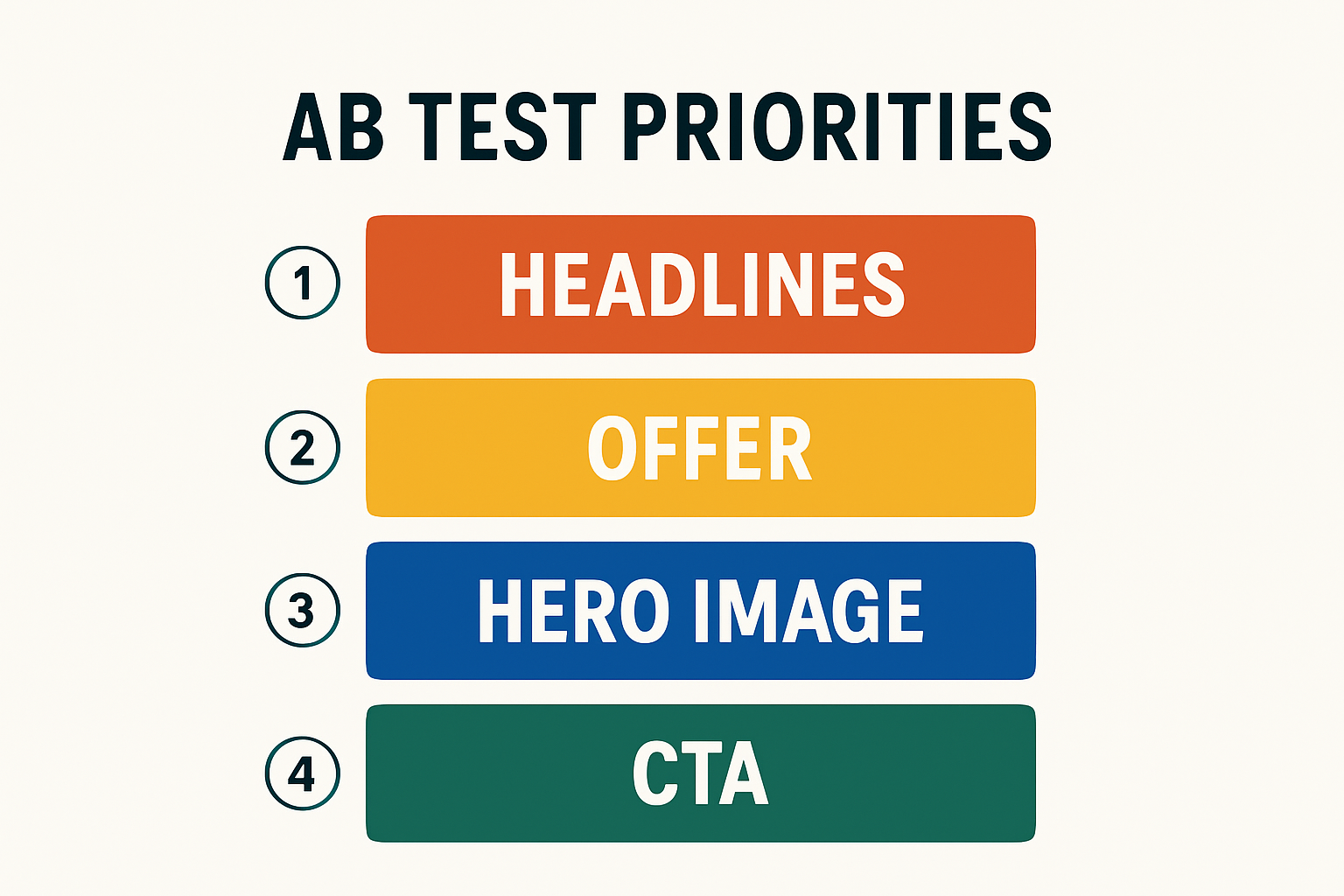
AI conversion rate optimization: testing priorities
Start with high-impact, low-effort tests and graduate to combined UX experiments. Use AI to suggest variants and predict uplift hypotheses—then let your data decide.
- Headlines and subheads (clarity, specificity, proof)
- Offer framing (trial length, guarantee, pricing language)
- Hero imagery and above-the-fold layout
- Primary CTA copy and placement
Step 7 — Analytics and Continuous Improvement
Build the feedback loop. Score content quality and business impact, then refine prompts, assets, and offers based on what the data shows.
Content scoring and feedback loops
- Quality: relevance, depth, accuracy, and readability.
- Engagement: CTR, scroll, time on page, video completes.
- Outcomes: conversions, influenced revenue, assisted pipeline.
- Learning: capture insights to update prompts and templates.
Prompt libraries and templates upkeep
Centralize prompts and content creation templates with version control. Add examples of "gold standard" outputs and keep a change log. This turns successful experiments into repeatable playbooks.
Governance, compliance, and risk management
Align on disclosures for AI assistance, data privacy, and source attribution. Maintain content logs (what changed, when, and why). Keep claims traceable to reputable sources and run periodic compliance reviews for U.S. audiences.
Recommended AI Content Creation Stack (Free to Pro)
Start lean with free tools; scale into suites when governance, integrations, or volume demand it.
Free AI content creation tools to start fast
- Pretty Headline (Free): design conversion-focused headlines fast; export HTML, React, PNG/JPG/WebP. Try the create a title in 60 seconds play.
- Prompt libraries: store winning prompts for blogs, ads, and thumbnails.
- OCR + transcription: convert images and audio to text for reuse.
When to invest in digital content creation software
- Multiple teams need shared templates, roles, and approvals.
- Security, SSO, and audit logs are required.
- Workflow integrations (CMS, DAM, analytics) become critical.
- Global versioning and localization at scale.
Tool evaluation checklist for teams
- Security: data handling, access control, audit trails.
- Quality: output consistency, templates, brand controls.
- Speed: time to first draft and time to publish.
- ROI: measurable impact on conversions and cost per asset.
- Fit: exports your team needs (e.g., HTML/React) and easy dev handoff.
Ready-to-Use Templates and Prompts
Copy these into your prompt library and adapt them to your brand.
Headline formulas for Pretty Headline
- Outcome + Time: "Get [Outcome] in [Timeframe] Without [Common Objection]".
- Number + Proof: "[Number] Ways to [Outcome] Backed by [Credible Source]".
- Job to Be Done: "The Fastest Way to [User Job]".
- Risk Reversal: "[Outcome], or Your Money Back".
Then style in Pretty Headline with highlights and subheads. For more patterns, see our free headline generator roundup.
Ad and social prompt packs
- Search ad: "Write 5 headlines and 4 descriptions for [Offer]. Persona: [ICP]. Stage: [BOFU/MOFU/TOFU]. Include one proof point."
- Social post: "Draft 3 hooks for a 15 second video about [Benefit]. Tone: clear, confident. Add 1 line CTA."
- Display: "Create 4 short punchy lines under 30 chars for banners promoting [Offer]."
Video storyboard and script templates
- Explainer 60s: Hook (0–3s), Problem (3–10s), Solution (10–25s), Demo (25–45s), Proof (45–55s), CTA (55–60s).
- Testimonial 30s: Context, Outcome, Specific Metric, CTA.
- Social 15s: Pattern interrupt, single benefit, CTA.
Implementation Guide for Developers and Designers
Translate creative outputs into clean, performant front-end deliverables without friction.
Embedding Pretty Headline HTML/React exports
Paste exported HTML directly into your CMS or drop the React snippet into your component library. Keep headings semantic (h1/h2), avoid nested interactive elements, and ensure copy remains editable in code for localization and testing.
Styling, responsiveness, and accessibility
- Use CSS clamp for fluid font sizes and line-height tuned for 2–3 lines.
- Maintain 4.5:1 color contrast; test dark mode variants.
- Respect prefers-reduced-motion; avoid auto-animated text.
- Keep focus states visible and logical.
QA checklist before go-live
- Validate rendering across breakpoints and browsers.
- Measure LCP, CLS, and TBT on staging; fix regressions.
- Confirm alt text, landmarks, and tab order.
- Verify analytics and experiment pixels are firing.
- Run copy, legal, and brand checks against your governance doc.
FAQ
What is AI content creation?
It's the use of AI to ideate, draft, design, and optimize content, combined with human governance and testing to deliver business results.
Where should I start for quick ROI?
Start with headlines. Use Pretty Headline to create variants fast, export HTML/React, and A/B test to capture immediate gains.
How do I keep AI content on-brand?
Use briefs and templates with voice, claims, and style rules. Centralize prompts and keep a version-controlled library.
Do I need a full software suite?
Begin with free creator tools. Invest in suites when you need roles, approvals, integrations, and audit trails at scale.
What should I test first for CRO?
Headlines, offer framing, hero image, and primary CTA. Test one variable at a time and measure CTR and conversion rate.
Conclusion and Next Steps
AI content creation pays off when you combine clear strategy, lightweight creator tools, and disciplined QA/CRO. Start with the fastest, highest-leverage win: the headline. Then scale into copy, visuals, and video, and close the loop with analytics.
Quick-start plan
- Pick one landing page and define the offer + primary conversion.
- Open Pretty Headline and generate 3 headline variants with a proof-driven subhead.
- Export HTML or React; implement and ship an A/B test.
- Review results in 7 days; iterate on the winner.
Product CTA reminder
Design your headline using the editor and export it as HTML, React code, PNG, JPG, or WebP. If you want more headline ideas, explore our headline and social tools guide.
Why this workflow works
It balances creator tools for speed (e.g., Pretty Headline) with governance and analytics for compounding ROI. You ship more high-quality variants, learn faster, and put wins into templates—creating a durable, measurable content engine.
Ready to Build Your AI Content Workflow?
Start with the highest-leverage step: design conversion-optimized headlines in under 60 seconds. No signup required.
Try Pretty Headline Now →